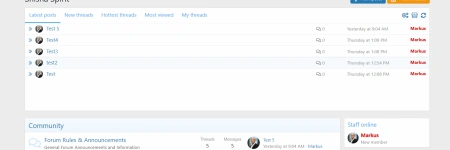
Hello, how do i show others tabs like Members > New Members? Its only showing these.

1644882900026.webp
 
Hello 021!

How things are doing around here? Hope for the best.

Just a quick question: can we add a tab to 'Watched Threads' for each member, is this possible?
 
Hello 021!

How things are doing around here? Hope for the best.

Just a quick question: can we add a tab to 'Watched Threads' for each member, is this possible?
Hello. Yes, it is possible. Just enable this option in the tab settings :)

Снимок экрана 2022-03-05 в 12.58.30.webp
 
Hi where can i change the color for:

1649942424153.webp


1649942444227.webp


1649942484882.webp


And how do i activate:

1649942504886.webp


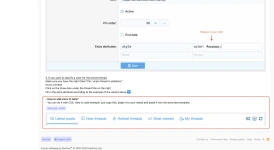
How to add icons like:

1649942532595.webp


I saw that on a different site the Tab Settings looks like this:

1649942565870.webp


On my site it looks like:
1649942692260.webp


It doesn't show new content from Resource Manger, the settings are as follows. Why couldn't I figure it out?
1649942739170.webp

1649942769762.webp
 
Hello, @Adem Aga

The color of the scrollbar is probably configured in your style settings, the add-on does not provide for customization of this element. You can customize its appearance manually with CSS if you are familiar with it.

The menu color can also be changed in the style settings (ACP -> Style -> Style properties -> Popup menus), but these changes will affect menus throughout the forum. For this element, unfortunately, customization is also not provided.

Code to change loader color (paste it in extra.less template)
Code:
.lfs .loader div {
    border-color: black; # replace black with your color
}

And how do i activate
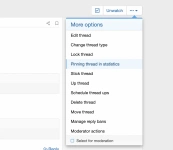
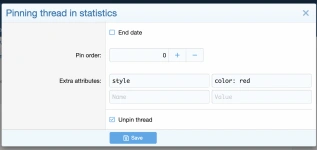
Your users must have permission to purchase thread pins and links in statistics. (ACP -> Permissions -> User groups -> Your main user group -> Live forum statistics section). Price, payment profiles and other parameters are in the settings (ACP -> Settings -> Live forum statistics).

How to add icons like
Added a manual to the FAQ.

On my site it looks like:
Your users must have permission to ignore forums in statistics to see that.

It doesn't show new content from Resource Manger, the settings are as follows. Why couldn't I figure it out?
Exclude all content types except resources.
 
Hello, @Adem Aga

The color of the scrollbar is probably configured in your style settings, the add-on does not provide for customization of this element. You can customize its appearance manually with CSS if you are familiar with it.

The menu color can also be changed in the style settings (ACP -> Style -> Style properties -> Popup menus), but these changes will affect menus throughout the forum. For this element, unfortunately, customization is also not provided.

Code to change loader color (paste it in extra.less template)
Code:
.lfs .loader div {
    border-color: black; # replace black with your color
}
I just addd it like:
1650032259683.png

But it is still the same color.
I try it as well here:<
1650032484157.png

But also without success. Would be this line the correct one changing the loader color ?


Your users must have permission to purchase thread pins and links in statistics. (ACP -> Permissions -> User groups -> Your main user group -> Live forum statistics section). Price, payment profiles and other parameters are in the settings (ACP -> Settings -> Live forum statistics).

I have it already active for the admin group
1650032752496.png


Added a manual to the FAQ.
I don't found here some information about adding icons


Your users must have permission to ignore forums in statistics to see that.
Okey

Exclude all content types except resources.
I do it like in the screenshot. But still the same.

1650033306524.png
 
Last edited:
But it is still the same color.
Delete everything after ;

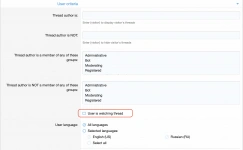
I have it already active for the admin group
Please note the text in bold. Permission to purchase pinning and permission to pin are two different permissions.
must have permission to purchase thread pins and links

I don't found here some information about adding icons
Снимок экрана 2022-04-17 в 21.08.15.webp


I do it like in the screenshot. But still the same.
Can I see the problem live?
 
Hi,


how can i edit the height of the widget so that it adapts flexibly to the maximum elements that occur ?

thank you
 
  • 1668243645330.webp
    1668243645330.webp
    53.7 KB · Views: 9
Last edited:
Hi,


how can i edit the height of the widget so that it adapts flexibly to the maximum elements that occur ?

thank you
Hello. To do this, you need to change value of the height property to auto in style settings (ACP -> Appearance -> Style properties -> Live forum statistics content -> Tab group content). Then the widget's height will be limited by the max-height property.
 
  • Like
Reactions: mle
Hello. To do this, you need to change value of the height property to auto in style settings (ACP -> Appearance -> Style properties -> Live forum statistics content -> Tab group content). Then the widget's height will be limited by the max-height property.

Thank you :)

Secound question. How can i disable the functions ignore threads / bookmark and report when i hoover over ?

Thanks
 
Secound question. How can i disable the functions ignore threads / bookmark and report when i hoover over ?
Uncheck Enable second data display for thread items checkbox in style properties (ACP -> Appearance -> Style properties -> Live forum statistics content)
 
Uncheck Enable second data display for thread items checkbox in style properties (ACP -> Appearance -> Style properties -> Live forum statistics content)

thanks, but then the specific forum will also be disable when hoovering. i only want to disable these icons.
 
Chat
Rooms will appear here
Connecting...
Connecting...
Have a question, issue or development request? Contact our team in private chat.
Run command
Edit message
  • Insert:

Members online